Showing posts with label usb charger. Show all posts

Friday, October 31, 2014

Top 6 USB Gadgets Tidy & Enrich Your Office Space

Office life sometimes are boring or at a loss for some of us. We can actually add some USB gadgets for a big change. I would love to share here some USB gadgets that help you better organize your limited office space and enrich your office life.

Solar USB charger

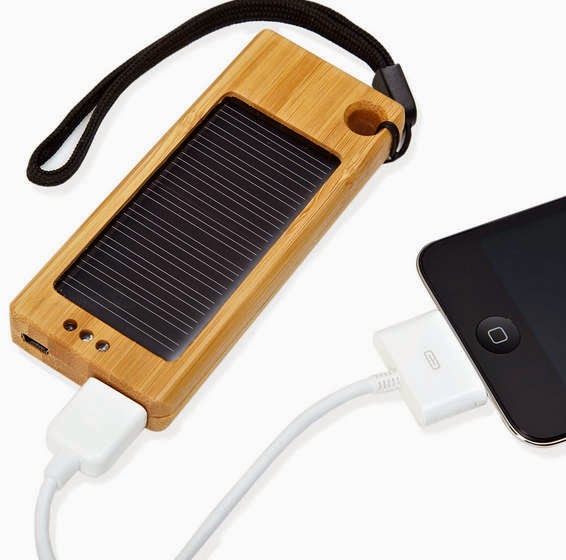
When your smart phone battery dies out, you plug it into the charger. When it is in full charge, you unplug it. It repeats every day. Nothing new. But this little solar USB charger makes a slight difference. Stick into the inside of a window and convert sunlight into battery juice. Stylish and fresh USB gadget.

USB Hub

Is your office space big enough? Is it tidy enough or at a mess? I think a lot of office staff do not like to see the desk table with a lot of cord-wrangling digital devices. Put a USB hub with more ports on the desk and we will not have to bring with us all the cables of the USB supported devices. USB hubs are now very common devices since they are the easiest way for us to increase the number of USB ports available. Besides, when we have to charge the smart phones, tablets, USB hard drive or memory sticks at the same time, we do not need to compete for USB outlets with others.

USB Coffee Warmer

Coffee in the office everyday seems inevitable. But sometimes we are occupied by a lot of tasks and have no time to make the coffee. Prepare a USB coffee warmer, and it will be a very good friend that offers us warm coffee whenever we want, at a place just next to the computer!

USB Humidifier

Office life is sometimes stuffy, especially when we have no time out for a breath. The USB humidifier is actually cool gadget that can help moisturize the air in the limited space. The humidifier has an aromatherapy option and can keep the best smelling space for us.

USB Charging Station

If you still don’t have one, get one. There is nothing more annoying than shuffling around more different USB cables when we have very few USB ports, especially when we end up unplugging the keyboard or mouse.

USB Hard Drive Docking Station

You may have used internal hard drives for a lot of years. But when you have to access the data inside the internal hard drive to another computer, especially when your computer fails to work,  how will you do? The USB SATA HDD docking station is actually an ideal setup for such tasks. We can access or fix several internal 3.5" HDDs from the malfunctioning Windows server and we can use it to make a carbon copy of the 2.5" internal hard drive in the Mac Mini.


Friday, September 19, 2014

Why USB Gadgets Slow to Charge?

We are now using standard USB ports to charge most of our electronic gadgets such as smart phones, cameras, tablets. For most of our time, we have to use our electronics and this is why we expect them to be fully charged all the time. We need even more - we want to charge our USB devices as quickly as possible. But, sometimes, it is annoying to find that after we have plugged in the electronics hours ago, the battery has just been 10% full. Or situation goes like this. The USB gadget just charges very fast in the beginning, yet when it is almost fully charged, the speed is slow. Then what affect the charging rate of our tablet or other USB devices? How to speed them up?  

Charge the gadgets from laptop with USB cable

We get a charger for our smart phones or other gadgets when we buy them. The mobile gadgets usually are equipped with an inbuilt charger circuit and a battery by the manufacturer. The power source of our smart phones is usually the charger that we plug into the wall outlet, exactly, a cable and a power adapter. Then, the thing matter here for a fast charging is the fact that different power sources offer different amperage. For Apple devices, we can get 5 Watts of charge with an iPhone power source when we plug it into a wall socket, 12 Watts from iPad power source. That’s the difference. If we use our laptop to charge our devices via USB cable, the charge amperage available can be 1.5 Watts. For fast charge, choose the AC wall charger.

Use the wrong cable types

Have you ever realized that though most of our devices can be charged by USB ports, but the USB cables are not the same. The differences in the USB cables provided by different manufacturers may also cause the slow charging speed. We need to check out the wire gauge when we try to charge our devices via a USB cable. The normal size of data and power wires inside the USB cable is usually 28/28 AWG, yet which is notorious for slow charging. We need to use 28/24AWG USB cable instead. Besides, we need to keep our USB cables well protected, for it can be easily get damaged.

Charge the smart phone faster as well as safely

Now that we figure out the amperage counts a lot for the charging speed, does that mean we can get the faster charging speed by using a higher milliamp power adapter? Not exactly. Sometimes the powerful adapter can even ruin our battery life. We have to realize that the inbuilt charging circuit can only take the power it needs. When the voltage is compatible, the use of 2000mA is meaningless. volt), there is technically no issue sending 2000mA down the cable and charging faster. Besides, often, our devices can be hot if they are charged via high wattage. The more amps may pose more threat to our cell phone.


Thursday, September 4, 2014

Top 5 Awesome & Useful Tech Gear for College Students

It's time to go back to college this fall. These days, back to school sales offer a lot of discounted tablets and other awesome gadgets that will make life and study easy and fun. That’s good for college students particularly who will love to fill the new backpacks with more high tech cool gadgets instead of books. It makes sense to prepare more tech gadgets because a large number of teachers also agree upon the tech requirement in the classroom or at home that better assist students study and research, especially for those independent learners. So are you left behind by those high tech students? Still, it is necessary to make a list for smart decisions. 

Portable Laser Keyboard
To get a portable keyboard is really a great convenience. For its small size, we can put it in our pant pockets and bring it home, to college or to the library as we like. The cube laser virtual keyboard can be connected to computer wirelessly. It seems much awesome than traditional roll up keyboard and still better than those pricey iPad keyboard. It just costs about $99. 

iDsonix 5 Port USB AC Wall Charger
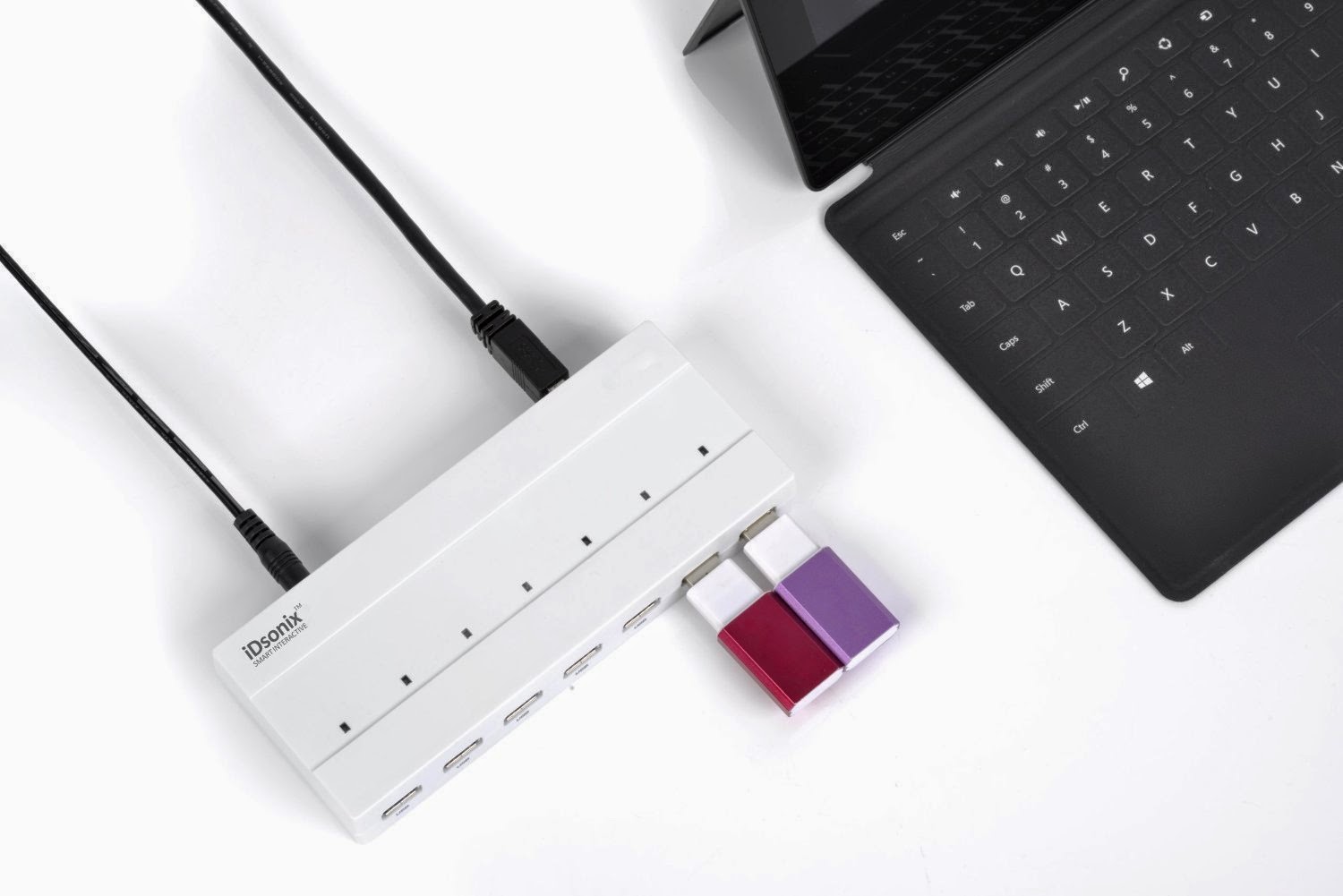
In the dorm room, there is always lack of socket and still our laptop will not offer us enough ports for charging phones or tablets. Then this 5 port wall charger seems much necessary. We can charge iPhone, iPad air mini or other USB powered gadgets at the same time. The compact design allows the wall charger to be a portable gadget for our trip. It saves us a lot and we do not need to spend extra dollars on adapters. We also do not need to waste all of our USB ports from the computer. We can share it with roommates to charge or power devices easily and quickly.

Cool Headphone That Cancels Noise
Most often, the college dorm rooms are noisy, whether it is the TV noise from neighboring rooms, or chat talk among roommates or just constant traffic in and out. The noise sometimes just distracts our attention from the schoolwork. Then the chic noise canceling headphone may be useful. Besides the quality sound effect, the headphone even offers more. It has some selective Apple products, enabling calls to be answered on an iPhone. Moreover, we can use the remote to control music functions on other Apple products. It is really cool and useful for college students. 

Kindle eReader
With the development of technology, college students have more choice in the ways of reading. We can choose to read books in digital format for it is more flexible to search the information we love or make some emphasis on the information we think important. Besides, the digital reader can be useful when we are on a trip. The new Kindle eReader is popular and awesome digital gadget in that it is saving space, time and even money. It is worth buying such eReader for we cna download a lot of free classic books for free, without spending more on books. The newest Kindle eReader can even hold up to 3,500 books. 

External Hard Drive

For college life, we have too many researches and sometimes, we may overlook he importance of data backup. Sometimes our computer may just fail to work or even crash for whatever reason. When that happens, all of the papers and efforts are lost. The external hard drive seems very useful gadget for students, for they have enough space for backing up the photos, phone, laptop or other electronic devices. This ultra portable hard drive with unique backup software that can back up the data itself. With hardware encryption, our data will stay there just safely. 

Got the gadgets on the list? Good. Let the study easier!"

Monday, August 25, 2014

Update Charging Brick For Something Better

Every new digital gadget we purchase will come along with its own matched charging brick and cable. That's great at first. But with the electronic devices we buy grow in numbers, we will have  a lot of charging cables, charging bricks or even wall adapters, scattering all around the room or in the drawer. Will you find it a trouble when we attempt to find the exact chargers and cables for one device yet to find them wind up in a mess? Actually, there is no need to use all of these chargers or we do not need all of them. 

Luckily, most of the chargers for our electronics are compatible and interchangeable. It’s easy to choose one single charger for all of the digital devices. Most of our chargers that go with different devices are USB supported ones, and we can use USB port to trade for a handful of the chargers. 

As long as our electronics can be powered via USB, most of the USB charging cable or USB supported wall brick can be substituted by the one USB charger or USB port for powering the devices, just in the way that our computer is connected to the devices for data transfer or powering. Of course, some of the new electronics may need some different charger or cable, such as micro USB, then we just need to prepare some mini USB. Anyway, we need to update a mess of chargers and cables with a free USB port. Or we can power multiple devices via several USB ports connected to one USB hub instead of plugging into the wall. 

If you have no idea of using the USB port and still want to charge the device via the charging brick, just bring one such brick along with you. Ensure the charging brick falls into the type which enables you to plug the USB cable into the brick itself. In this case, we can use the charging brick with any other devices that are to be charged via USB.  

Change the Charging Brick With USB Hub with Surge Protector
Nowadays the appearance of the USB hub with multiple ports just clear up our desk that is originally a mess of charging brick and cables. Have you ever tried the USB hub? The fact that such USB hub with more ports as well as build-in surge protector allows a fast, reliable and secure connectivity to various digital devices and that means we can turn any single plug into enough plugs for powering various devices at one time. 

The hub has great compatibility in that it supports Windows, OS X, Linux and all USB 2.0, very great and convenient option for connecting our computer and USB storage devices. The sleek beauty of the portable surge protector makes it good choice at home or even on the go. The speed is fast enough. 

There are a lot of USB hubs in the market that can ultimately allow us to leave various charging bricks behind at home. We won't need anything else. It is obvious that the USB hub with multiple ports may be the best option if we have to charge more than one devices at the same time quickly.   

Wednesday, August 20, 2014

Different Chargers Available For Choice

When we buy a new smartphone, we will also get a wall charger for the phone. Actually, we can use other charger models for powering the phone. When our basic wall charger has something wrong, we will get new chargers. We need to consider when and where we will charge our devices. There are even chargers even powered by different energy sources. We can get a spare charger in case of loss or breakage. We can get a solar cell phone if we are often on the go. 

The first thing we need to consider upon getting a charger is compatibility. There may be some chargers that just fail to be plugged into our phone. If we do not want to be bothered with this problem, we can turn to micro-USB charging port. Of course, some of the phones will not be compatible with the mini USB chargers. 


With so many options of charger, how to make the decision? It is really no need to prepare all of those new types of chargers available in the market. We can see the chargers nowadays updated in the market have some basic features. Some are best for home or office use while some are designed specifically for the car. For those people who have trip often can choose a charger that runs on an alternative fuel source. In an emergency, a battery-powered cell phone charger could potentially save a life. If we have more devices but not enough chargers, we can try docking station that can charge more devices via the USB ports at the same time. 

As for the charging docking station, the phone can slip into the docking station via charging port. It’s very convenient to use the docking station for we can still use the phone while it is in charge. We can see some of the docking stations with speakers for listening to music stored on the phone. We can charge devices via docking station with multiple ports with our family members at one time. several mobile devices to charge at one time. Similar to docking station, we can use charge mats for convenient charging, and the charging mat has no direct port connection.

If we are often on the go, we can get vehicle cell phone chargers or charging adapter for the vehicle. Our car charger can power the smart phone via the vehicle’s battery. During a trip to different countries, we don’t have to worry about varying voltages if we have chargers that can run on alternative energy. It’s efficient. Here comes an even more eco friendly charger - solar charger. The solar charger can store the solar power in a battery for later use. When we get solar panels, we need to know they differ in efficiency. The solar charger usually comes with various adapters for maximum compatibility, but the only disadvantage is the dependence on direct sunlight. If there is no sunlight and we are also outside without electricity power, how to charge the electronics? We can use hand crank cell phone chargers. They can be of great help in emergency situations and inclement weather since they are powered by hand, with electricity being generated via our own muscle power.  

The chargers are just updated at a very fast speed.When looking for a new phone charger, the importance of device compatibility cannot be stressed enough. Aside from that, we need to consider our habits and lifestyle to determine when and where we most often need a charge.  

Monday, August 18, 2014

Phone Charger With Innovative Design

Is the phone charger you use is the one that goes with the phone when you bought it? Or have you ever noticed some of the innovative cell phone chargers others use? Are those new USB phone chargers or phone chargers with new design concept just a bunch of non-sense that you will never waste your dollars on? If you are the one that will be easily frustrated when the phone is out of battery yet can see no power outlet available or you are always on the go, you will love some of the new phone chargers that are eco friendly and can offer you power during the trip. If you are fashion conscious person, you will be attracted by the innovative design of the phone chargers.  

Later I will share some of the chargers with innovative design. You will find the phone chargers can be of great help during your long airplane ride or camping trips. Besides the sustainability, the chargers are much about user practicality. Of course, some of the phone chargers are not only practical, but also very nice accessory. 

Ever try to wear phone chargers on your wrist?
If you are outside for several days’ camping, you will love this wrist-wearable charger. It is a solar powered battery charger. When fully charged, it can offer several hours of charge for the camera, phones, and other electronic device. With output of 5 Watts at 1 Amp, it is enough to recharge a phone in about half an hour. We can wear the portable battery as a wrist watch, really chic accessory. Unlike other portable power sources, the wrist wearable charger is much compact and we will hardly misplace it during outdoor activities. Though not meant to last long, it can offer power long enough for us to find an outlet to charger the phone. In this sense, it is still a good addition for on-the-go. Still, it can be a very cool fashion accessory. 

Try bamboo charger for green tech 
The charger is made out of 100% natural bamboo and the design of the charger just advances the green tech. With the smart solar charger, we do not have to worry about the phone power dies out. It makes use of the sun to charge any USB supported digital gadgets and the charger is put inside sustainable bamboo case. So eco-friendly. Moreover, the charger can even help keep you safely connected during a whole day of hiking up and down the peaks.

Make your sneakers a charger
Instead of rushing back home for charging your digital devices, you can charge your device while walking. A really ‘wow’ device, right? It is basically shifting the movement into electric energy, or specifically, the movement of our body, run or walk, will charge the battery of our devices. Really innovative design. It is a charger especially great help for those on the go and fail to keep up with the battery need of their electronic devices. It is cool to see the device just fit inside of sneakers. 

Juice Box Shaped Charger

This is a very cute and innovative charger with juice box shape. It just breaks out the traditional portable chargers in the design. We can easily imagine that our phone needs some energy when they are out of power. We supply the phone energy via the drink container. Super fresh idea. The charger is a normal charging port that can support most of the phone models with the USB outlet. We can use it to charge our camera, phone, MP3 player or other USB devices.  

USB hub with multiple ports 

The multiple ports from one USB hub can charge various devices at the same time. We no longer need to wait for an open plug to charge our iphone or tablet. The multi-port charger is perfect for office and with this charger, we do not need to ask others for a charger or bring with us chargers from home. The data transfer rate of the charger is rather fast. Just plug and play. No driver required. Convenient. 

There are a lot of chargers with new design concept. It is time that you update your chargers. 

Monday, August 11, 2014

USB Hubs Add Connectivity to More Devices

Sometimes, we just encounter with such a situation that we have several electronic devices out of power at the same time, but we only have one USB port. It is really disappointing when we can do nothing but wait for each of the devices to get charged one by one. If we get a hub with more ports, things will be easier.

How to Choose USB Hubs

We can find a lot of USB hubs in the market for computers or other digital devices. The USB hubs come in all shapes, sizes and configurations. We can find internal USB hubs, external powered USB hubs, USB 1.1, USB 2.0 and USB 3.0 hub. Faced with so many usb hubs, we need to take into consideration several questions before we get a new USB HUB, such as the devices we use, the ports of the laptop, the usb hubs we have already had. If we have more devices, we need to get hub with multiple ports. If we are often on the go, we need to get some USB hubs that are portable, compact and perfect for traveling.

Four USB Hub As Best Deal

We can spend more dollars to get a newest model, say, USB 3.0 hub with multiple ports that can offer super fast data transfer speed and enough power supply to high power usb devices. We can also spend less to get USB 2.0 hub that is enough to solve our need of more than one port to charge the gadgets. For different needs and budget, we can get the USB hubs we need. But here, i just want to try to share some USB hubs that is considered the best & cheapest deal.

iDsonix USB 3.0 10 Port Hub On/Off Switch

This is a USB Hub 3.0 with 10 ports. The hub has an additional on/off buttons as well as a LED indicator lights that can tell us which USB ports are in use at any given time. The hub is compatible with USB 2.0, or 1.1 devices. The charging port can give out enough current to devices from a smart phone to a laptop or tablet. The data transfer rate can reach up to 5Gbps, super fast.

Anker 7-Port or 9-Port USB 3.0 Hubs

A lot of digital gadget lovers may not strange to the brand Anker. The USB 3.0 hubs are also very popular, for its unique design. It has very small size and a lot of the on-the-go love to use it and place the hub in the bag. The Hubs are actually not the cheapest models around, but it is still worth your investment.

Macally Mini 7-Port USB 2.0 Hub

You will love the pyramid shape. The hub has very simple design, and the price is affordable. Moreover, it is much functional. If you don’t need seven ports, you can also get a four-port Macally hub.

Belkin 2 in 1 USB 2.0 7 Port Hub

It comes with a power adapter, but runs fine without it. This USB hub come with seven ports, enough for charging several devices at one time.. It can hold paper clips and the like in the area around it. Plus the grey part unplugs and goes along wherever you go offering 4 extra ports. It is also a very affordable hub.

Choose Right USB Hubs For Easy Connectivity

While there are many choices with USB hubs, be sure to take the time to find the right one for you. Color and size may be importable, but pay much attention to the uses and positioning of current and future devices. Making the right choice can simplify life, save money, and ensure a great networking experience.

Friday, August 8, 2014

7 Tips Help You Charge USB Powered Devices Faster

You must have such situations that you need to leave your home very soon while your smart phone is still not fully charger and you have to charge it as much as possible in very limited time. If you plug it into the laptop or computer, it will even take more time. Slow charging speed will make you feel uncomfortable. Here we have shared you some of the tips that will help make the phone charge very fast. Just read on. 

1. If you really like to charge your smart phone through your computer, instead of USB 2.0, try to use USB 3.0 or a dedicated charging if possible. Not all ports of the laptop or computer will supply the same amount of power. USB 1.0 and USB 2.0 are capable of 500mA of power, while USB 3.0 can deliver nearly double power, which usually reaches 900mA, that means faster. You can also choose a dedicated charging port that can offer power of even 1500mA. You have to know that the higher the supply of power, the faster your phone will be fully charged.If you happen to be lucky enough to have a plug outlet that is already wired for USB, you could be looking at speeds of up to 2,100mA.

2. USB 3.0 port charger is suggested. The USB 3.0 charger is well known for its faster data transfer sped and you will be glad to see its 900mA, almost reaching the powerful performance of AC wall chargers. So if you have no USB 3.0 charger, just get one for more powerful pace.  

3.Avoid the USB hub if you really need faster charging. Charging your smartphone via USB hub will just makes the charging speed slower by 50%, especially if your hub has no AC power connection. Choose a dedicated USB port for charging your digital devices. 

4.Just as i have said above, the higher power supply, the faster charging speed. Yes, you can choose to a bigger machine, or AC-wired USB power that can offer power twice of that of traditional charger or the speed can be 4 times faster than that of USB 2.0 port on the computer. For those larger and older computer, they have bigger batteries. You can use them to charge your phone instead of Ultrabooks.

5.Try a docking station. Docking station is thought to be slower than AC wall charger. But it can charge the smart phone at a speed 1.5 faster than that of usb 2.0 port. 

6. If you are driving a car out and your phone is out of power. Instead of charging it with a portable USB charger, just charge your smart phone via the car charger. This inexpensive usb charger can offer 1000to 2500mA , charging the phone within one hour.  

7. Switch off your phone and this is one of the ways that can speed up the charging. If you are too concerned about your phone calls and messages to respond back, then try to read on. The phone will try to search for possible signal and that just makes it use more charge. You can put the phone in Airplane mode or try an amplifier to stimulate the battery. If you do not switch the phone off, try to turn off vibration which will grab more charge. Or turn off apps when you are putting your phone in charge. This is because the more you make your phone to use a memory, the more it eats your charge. 

Tuesday, August 5, 2014

Tips for Charging Mobile Phones or Tablets

Will you think more about the safety use of the phone chargers or other USB charging port when you charge your devices every day? Have you ever thought about how to charge the phone in a faster and safer way or how to charge the phone easily when you are out for a trip? Let's have a look at some tips about using the chargers.

In the past years, we see more and more mini USB chargers, or the charging device with micro USB ports. The use of the standardized chargers just makes our life easier. The standardized charging ports just realize spare chargers when we are out, but of course, with exception to Apple's iPhone. Actually, the standardized charging port still brings us confusion with charging speeds depending on the charger and charging method. The choice of a wrong usb charger requires longer charging time. We need to check the charger about its output voltage and current. An iPad requires 2 Amps for charging. While iPhone charger gets 1 Amp of current and a computer 0.5 Amps of current.

How to Prolong Lifespan of Charger Battery

As we all know, batteries have limited charge cycles or lifespan. So does the battery for charger. The lifespan of lithium-ion phone charger battery can be prolonged if we use it on a regular basis. We should not leave the battery drained out of battery every time. It’s much better to charge the phone when we find the battery dropped below 50% and this can help increase the charge circles.


Turn off the phone while charging

If you do not need to use your mobile phone while it is charged, you can choose to turn off the phone. In this way, it will charge in a faster speed because there is no use of power for those power draining features like data, GPS, or screen.

Portable Chargers for Mobile Charging

For those who have lots of time spent outdoors, a portable battery pack is a great option. Without any access to power socket, the portable battery packs can work as a good replacement of your wall charger. For its portability, we can carry it in our backpack. The portable charger can charge our phones several times. Keep in mind, that we still need to check the output current of the battery pack and avoid those cheap chargers with output at about 0.5 Amps. Choose portable battery packs that can offer 1 Amp or even 2Amps for tablet and that can ensure very fast charging.

Wireless Charging

The appearance of wireless charging is a revolution of the chargers that we have used. We do not need cable and we just make use of electromagnetic induction to charge our phones, very convenient. If we choose wireless charging, we will not see too many cables or wires at a mess on the desk. In public areas, we do not need to carry our own charging wires and charging can also be very easy. Now wireless charging technology is available for Nokia Lumia 920 and the Google Nexus 4. To charge other smart phones, we need a compatible charging mat.

No matter what type of the chargers or charging we choose, USB charger, wireless charging or the traditional AC wall charger, we need to make sure the charger with right current output and top up the battery regularly to prolong its lifetime.