You have bought iPhone, iPad, Nexus, Galaxy and a couple of tablets as well. Over the time, you have just stocked up a lot of USB chargers. Will you use the iPhone charger to charge iPad or plug the charger of smart phones of brand for another? Is that right to do so? Have you ever asked yourself such question, ‘Can I use any of the charger for different devices?’
In the past when the mobile devices have not been so diversified, the chargers were still vastly different. We may need to have a check of the output voltage of the charger so that it can just matched the output of the devices we used. The wrong charger may lead to the damage to the charger and the digital gadget as well.
For solving the difference of phone chargers, manufacturers then settled on a standard for USB charging. Almost all of the smart phones or other devices come with USB charger that can be interchangeably used. That just allows us to use any of the USB chargers included with the phone or tablet with any other phone or tablet made after 2007.
If you think all of the chargers are now created equally, you would still need to know more. We all know we need to pick the right charger with the right amperage. Actually, we can use chargers of higher amperage to get the phone charged up in less time than it would if we charge it via USB or we use the charger that came with the phone.
For example, we need to charge an iPad mini. The iPad mini charger delivers 10 watts (5.1 volts at 2100 mA). We can use a lightning connector plugged into a computer via USB, which delivers 2.5 watts of power (5 volts at 500mA) or an iPhone charger connected to a wall socket 5 Watts (5 volts at 1000 mA) to charge the iPad. But the charging time can be longer than if we use the iPad charger. Conversely, we can charge our iPhone very fast if we use the iPad charger.
It is really the amperage that decides how fast a charger will deliver power to our devices. For faster charging, choose a wall charger or car charger that can supply 2100 mA of current at 5 volts.
Still some questions here:
Is it right to use a USB port to charge without a plug in charger? Yes, we can plug our device into any USB port and the device will charge just fine.
Is it right to use a third-party charger with my phone? Yes and just be careful not to buy anything too cheap. Get those well known brand names which perform better and are much safer to use.
iDsonix - Welcome to our digital technology blog for latest happenings in computer and digital industry. We share the latest computer and digital peripheral products, latest digital accessories for such devices as laptop, PC desktop, Tablet PC, smart phone, etc and share convenience and happiness brought by the latest digital technology.
Showing posts with label USB charging. Show all posts
Thursday, January 22, 2015
Monday, August 25, 2014
Update Charging Brick For Something Better
Every new digital gadget we purchase will come along with its own matched charging brick and cable. That's great at first. But with the electronic devices we buy grow in numbers, we will have a lot of charging cables, charging bricks or even wall adapters, scattering all around the room or in the drawer. Will you find it a trouble when we attempt to find the exact chargers and cables for one device yet to find them wind up in a mess? Actually, there is no need to use all of these chargers or we do not need all of them.
Luckily, most of the chargers for our electronics are compatible and interchangeable. It’s easy to choose one single charger for all of the digital devices. Most of our chargers that go with different devices are USB supported ones, and we can use USB port to trade for a handful of the chargers.
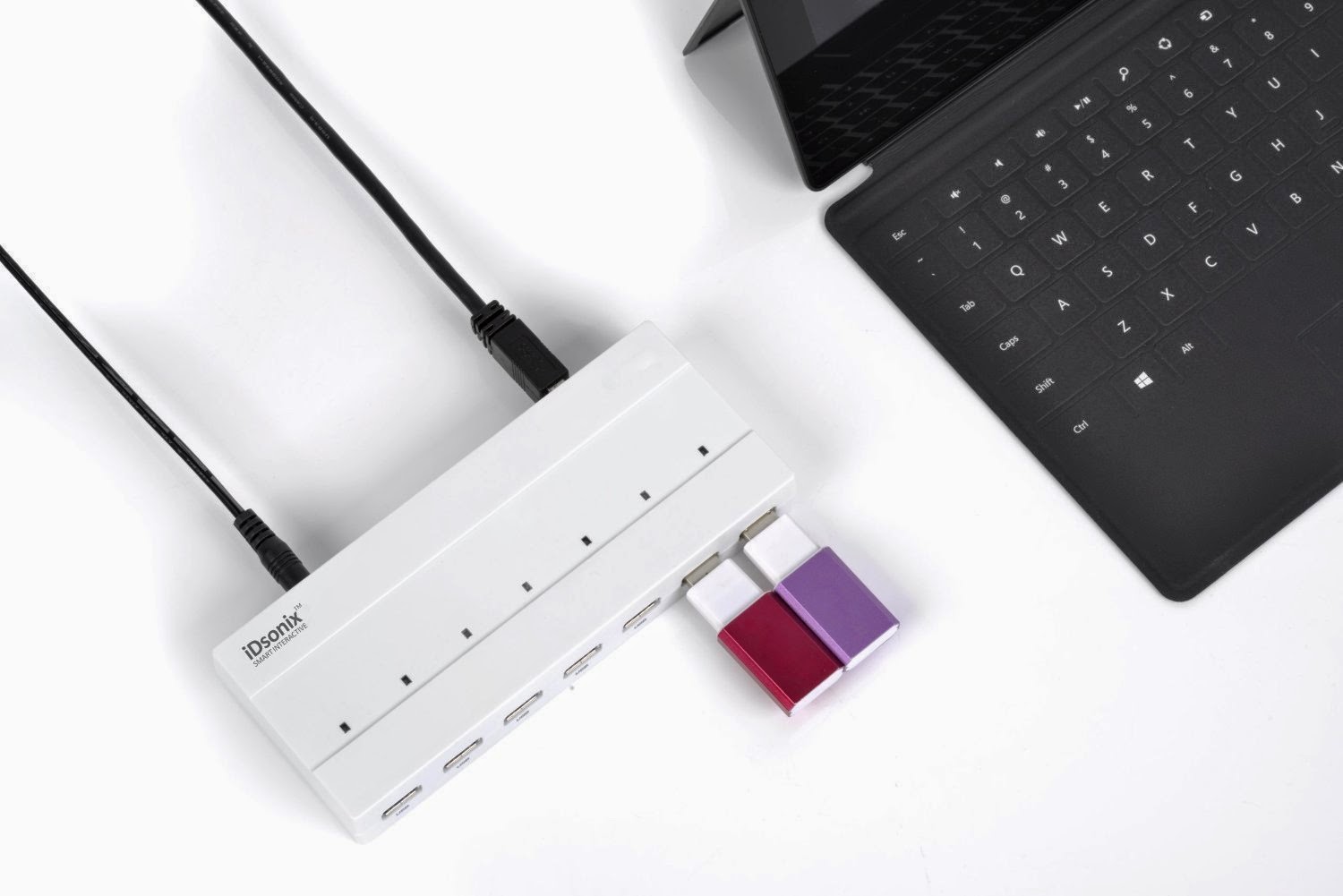
As long as our electronics can be powered via USB, most of the USB charging cable or USB supported wall brick can be substituted by the one USB charger or USB port for powering the devices, just in the way that our computer is connected to the devices for data transfer or powering. Of course, some of the new electronics may need some different charger or cable, such as micro USB, then we just need to prepare some mini USB. Anyway, we need to update a mess of chargers and cables with a free USB port. Or we can power multiple devices via several USB ports connected to one USB hub instead of plugging into the wall.
If you have no idea of using the USB port and still want to charge the device via the charging brick, just bring one such brick along with you. Ensure the charging brick falls into the type which enables you to plug the USB cable into the brick itself. In this case, we can use the charging brick with any other devices that are to be charged via USB.
Change the Charging Brick With USB Hub with Surge Protector
Nowadays the appearance of the USB hub with multiple ports just clear up our desk that is originally a mess of charging brick and cables. Have you ever tried the USB hub? The fact that such USB hub with more ports as well as build-in surge protector allows a fast, reliable and secure connectivity to various digital devices and that means we can turn any single plug into enough plugs for powering various devices at one time.
The hub has great compatibility in that it supports Windows, OS X, Linux and all USB 2.0, very great and convenient option for connecting our computer and USB storage devices. The sleek beauty of the portable surge protector makes it good choice at home or even on the go. The speed is fast enough.
There are a lot of USB hubs in the market that can ultimately allow us to leave various charging bricks behind at home. We won't need anything else. It is obvious that the USB hub with multiple ports may be the best option if we have to charge more than one devices at the same time quickly.
Wednesday, August 20, 2014
Different Chargers Available For Choice
When we buy a new smartphone, we will also get a wall charger for the phone. Actually, we can use other charger models for powering the phone. When our basic wall charger has something wrong, we will get new chargers. We need to consider when and where we will charge our devices. There are even chargers even powered by different energy sources. We can get a spare charger in case of loss or breakage. We can get a solar cell phone if we are often on the go.
The first thing we need to consider upon getting a charger is compatibility. There may be some chargers that just fail to be plugged into our phone. If we do not want to be bothered with this problem, we can turn to micro-USB charging port. Of course, some of the phones will not be compatible with the mini USB chargers.
With so many options of charger, how to make the decision? It is really no need to prepare all of those new types of chargers available in the market. We can see the chargers nowadays updated in the market have some basic features. Some are best for home or office use while some are designed specifically for the car. For those people who have trip often can choose a charger that runs on an alternative fuel source. In an emergency, a battery-powered cell phone charger could potentially save a life. If we have more devices but not enough chargers, we can try docking station that can charge more devices via the USB ports at the same time.
As for the charging docking station, the phone can slip into the docking station via charging port. It’s very convenient to use the docking station for we can still use the phone while it is in charge. We can see some of the docking stations with speakers for listening to music stored on the phone. We can charge devices via docking station with multiple ports with our family members at one time. several mobile devices to charge at one time. Similar to docking station, we can use charge mats for convenient charging, and the charging mat has no direct port connection.
If we are often on the go, we can get vehicle cell phone chargers or charging adapter for the vehicle. Our car charger can power the smart phone via the vehicle’s battery. During a trip to different countries, we don’t have to worry about varying voltages if we have chargers that can run on alternative energy. It’s efficient. Here comes an even more eco friendly charger - solar charger. The solar charger can store the solar power in a battery for later use. When we get solar panels, we need to know they differ in efficiency. The solar charger usually comes with various adapters for maximum compatibility, but the only disadvantage is the dependence on direct sunlight. If there is no sunlight and we are also outside without electricity power, how to charge the electronics? We can use hand crank cell phone chargers. They can be of great help in emergency situations and inclement weather since they are powered by hand, with electricity being generated via our own muscle power.
The chargers are just updated at a very fast speed.When looking for a new phone charger, the importance of device compatibility cannot be stressed enough. Aside from that, we need to consider our habits and lifestyle to determine when and where we most often need a charge.
The first thing we need to consider upon getting a charger is compatibility. There may be some chargers that just fail to be plugged into our phone. If we do not want to be bothered with this problem, we can turn to micro-USB charging port. Of course, some of the phones will not be compatible with the mini USB chargers.
With so many options of charger, how to make the decision? It is really no need to prepare all of those new types of chargers available in the market. We can see the chargers nowadays updated in the market have some basic features. Some are best for home or office use while some are designed specifically for the car. For those people who have trip often can choose a charger that runs on an alternative fuel source. In an emergency, a battery-powered cell phone charger could potentially save a life. If we have more devices but not enough chargers, we can try docking station that can charge more devices via the USB ports at the same time.
As for the charging docking station, the phone can slip into the docking station via charging port. It’s very convenient to use the docking station for we can still use the phone while it is in charge. We can see some of the docking stations with speakers for listening to music stored on the phone. We can charge devices via docking station with multiple ports with our family members at one time. several mobile devices to charge at one time. Similar to docking station, we can use charge mats for convenient charging, and the charging mat has no direct port connection.
If we are often on the go, we can get vehicle cell phone chargers or charging adapter for the vehicle. Our car charger can power the smart phone via the vehicle’s battery. During a trip to different countries, we don’t have to worry about varying voltages if we have chargers that can run on alternative energy. It’s efficient. Here comes an even more eco friendly charger - solar charger. The solar charger can store the solar power in a battery for later use. When we get solar panels, we need to know they differ in efficiency. The solar charger usually comes with various adapters for maximum compatibility, but the only disadvantage is the dependence on direct sunlight. If there is no sunlight and we are also outside without electricity power, how to charge the electronics? We can use hand crank cell phone chargers. They can be of great help in emergency situations and inclement weather since they are powered by hand, with electricity being generated via our own muscle power.
The chargers are just updated at a very fast speed.When looking for a new phone charger, the importance of device compatibility cannot be stressed enough. Aside from that, we need to consider our habits and lifestyle to determine when and where we most often need a charge.
Thursday, July 31, 2014
Right USB Chargers For Safe Charging
We may sometimes just leave our USB charger at home when we are out for a trip, say, 600 miles away. Then it’s time to get a new charger. Get a cheaper charger from the electronics store that is just near the hotel you live in. What happens next? For full charging, we need to wait for 10 hours while the normal charging time is 3 hours.
Actually, not all the USB chargers or connectors are born equal, though they look almost the same. Some wall chargers are stronger than others. One USB socket on a laptop is seemingly more powerful than the other. On some desktop PCs, even when they’re turned off, we can charge our phone via a USB socket. Sound a bit complex? Let’s just have a look at how the USB power works briefly.
In the current market, there are three main USB charger specifications — USB 1.0, 2.0, and USB 3.0. For any USB network, there is one host and one device, with the power flowing from the host to the device, yet data just transferring in both directions.. Our PC is the host, and the smartphone or tablet is often the device. There are three kinds of USB port dictated by the current specs: a standard downstream port, a charging downstream port, and a dedicated charging port. The first two can be found on computer and the third kind applies to wall chargers.The USB spec allows for a “sleep-and-charge” port, which is where the USB ports on a powered-down computer remain active. On the desktop PC, there is some power flowing through the motherboard, but some laptops are also capable of sleep-and-charge.
We hear often that some iphone just blow up during the charging time. So why does that happen? If we take a smartphone which came with a 900mA wall charger, and plug it into a 2100mA iPad charger, will it blow up? No. Using a more powerful charger should speed up battery charging. For modern USB device, we can plug it into a high-amperage USB port and enjoy faster charging. Yet for those older devices, maybe the USB 1.0 and 2.0 PC ports are safe.
Then what to look for when we try to buy the chargers?
First, some background. Charging power is based on three things: power, current and voltage. Power is the product of current multiplied by voltage. Because larger devices like tablets have substantially bigger batteries than smartphones, the chargers will deliver energy at a higher rate. We could use a Lightning connector plugged into a computer, an iPhone charger connected to a wall socket, or an iPad charger connected to a wall socket. A PC USB charger delivers 2.5 Watts of power. An iPhone charger delivers 5 Watts. The charging speed is always decided by the amperage. For quicker charging, just try a wall charger or car charger. Before we buy the charger, just make sure the logo that identifies compliance with international standards.
Now there are a variety of chargers in the market, from multiple ports USB chargers to some chargers with trendsetting patterns. Just make sure the charges can go well with your electronic devices for safe charging.
Subscribe to:
Posts (Atom)