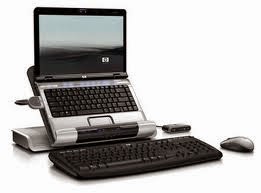
Computer peripherals are any external devices offering input or output for our computers. No matter how excellent the performance of our computer or PC, without certain peripheral accessories, it can hardly achieve all work very efficiently for us. Peripheral accessories can be external ones ranging from mouse, keyboard, monitor, scanner, external hard drives, USB hub, printer and also internal ones, such as internal modem, internal hard drive.
We do not need to get all of the different computer peripherals, because there are more and more computer accessories in the market and some of the accessories may not be frequently used during our work or entertainment. But some of the computer peripherals are very necessary because they may make or just break our computing experience. Besides, computer peripheral accessories of similar functions may differ in features or performance. For more efficient working or more pleasant entertainment with the computer, we need to check whether our computer accessories have the following features.
USB 3.0
Similar to high definition, the new USB standard used to be found in those high end gadgets, but now we can see a lot of computer peripheral accessories such as USB hub, USB hard drive docking station or external hard drives own such feature. USB 3.0 is an excellent upgrade of USB 2.0, about 10 times faster than USB 2.0, which can help greatly cut down on file transfer times. Besides, USB 3.0 delivers greater power and power our gadgets very quickly. Moreover, USB 3.0 has excellent compatibility and is able to work with USB 2 port. If you want to invest in new peripherals, try to choose USB 3.0 ones.
Noise Cancellation
Usually, this feature is especially needed in peripherals such as headphone. Headphones with such feature can keep us free from the disturbing noise in the office and keep us engaged in work. Besides, when we are on a trip, such headphone may bring us a serene environment. Now peripherals with such features may cost a bit more.
Extra USB Ports
Now we have too many peripherals that need to be connected to computer or PC via USB ports. Yet our computer has limited USB ports and we usually lack USB ports. We can choose the peripherals that offer us extra USB ports such as USB hub. Or we choose the accessories with extra USB ports. Now some peripheral suppliers may pack such feature in the keyboards.
Automatic Backup
This is a very important feature of modern computer peripherals. When we need to back up the gadgets, do the old “set and forget” and that will make things easier.
Solar Technology
Now more and more digital gadgets as well as computer and mobile peripheral accessories become portable. We bring with us these gadgets during our trip. Then it is sometimes troublesome when we are out with gadgets out of power yet there is no electricity available. Then we need to try peripheral accessories with solar technology, a kind of knowledge that will never run out of battery.
iDsonix - Welcome to our digital technology blog for latest happenings in computer and digital industry. We share the latest computer and digital peripheral products, latest digital accessories for such devices as laptop, PC desktop, Tablet PC, smart phone, etc and share convenience and happiness brought by the latest digital technology.
Showing posts with label peripherals. Show all posts
Friday, March 20, 2015
Wednesday, March 4, 2015
What Do You Think Are Necessary Peripheral Accessories for Your Office
What is the most obvious feature of our modern office? Mobility! Yes, For the past few years, our office life become mobile. We can extend our office life outside the entity office as long as we have necessary equipment, network or resources.
More efficient office life requires the basic equipment as well as peripheral accessories which necessarily ensure accessibility, hardware compatibility and maximum functions. What kind of peripheral accessories do you have in your office? Check out whether you have these peripherals for your mobile office.
For basic performance of office task, our computer needs to be equipped with a few applications. The basic software list include word processing, security, communication apps and other supplementary tools like calculators.
We need external storage. We may have a lot of data and over time, our computer is not big enough to store the data. Or we need to perform data transfer among colleagues. External storage devices, though less popular together with the wide use of cloud storage, are still necessary if the network condition is not good enough or we need to ensure the security of our data. Besides, now USB gadgets for external storage are designed with more and more storage space yet come in smaller and smaller size. They are very portable gadgets that can fit in our pocket, or even can be used as part of accessory of our outfit.
Now we use more and more electronic devices for more efficient work. We have more frequent business trip or we have to attend meeting in coffee shop. Unfortunately, our computers or PCs have a limited number of USB ports. USB hub is a computer peripheral that we need for extra more USB ports as well as fast transfer speed. Now USB hubs are diversified in design and function. USB hubs are designed with more ports and allow for fast charging function as well as data transfer at rather fast speed. We need portable USB hub with excellent compatibility and fast speed.

Mobile Charger for More Devices
We have more and more electronic devices and now most of the battery can hardly support the whole day operation of our gadgets. We need to charge them at least twice a day and several devices may need to be juiced. Mobile office life means we may be venturing into places without AC sockets to plug our devices. Office life also means we may have no enough USB ports or enough sockets for charging several gadgets at the same time. We need mobile charger, the one with more ports or the one that can juice several gadgets simultaneously. We need a wireless charger during business trip, a USB AC wall charger with more USB ports at the office, or a portable charging station when we have to bring with us a lot of devices.
USB hard drive docking station also seems necessary for easier fix of internal hard drives or more convenient for data transfer than USB drives, especially if we have too large data to transfer, copy or burn. USB hard drive dock station is easy to use now, without any need of additional driver or application. Most of the dock station can easily transfer data from 2.5"/3.5" SATA hard drive or SSD to our computer through USB 3.0. If you have to access and fix several internal hard drives from malfunctioning computer, you will know how great such computer peripheral is.
More efficient office life requires the basic equipment as well as peripheral accessories which necessarily ensure accessibility, hardware compatibility and maximum functions. What kind of peripheral accessories do you have in your office? Check out whether you have these peripherals for your mobile office.
For basic performance of office task, our computer needs to be equipped with a few applications. The basic software list include word processing, security, communication apps and other supplementary tools like calculators.
We need external storage. We may have a lot of data and over time, our computer is not big enough to store the data. Or we need to perform data transfer among colleagues. External storage devices, though less popular together with the wide use of cloud storage, are still necessary if the network condition is not good enough or we need to ensure the security of our data. Besides, now USB gadgets for external storage are designed with more and more storage space yet come in smaller and smaller size. They are very portable gadgets that can fit in our pocket, or even can be used as part of accessory of our outfit.
Now we use more and more electronic devices for more efficient work. We have more frequent business trip or we have to attend meeting in coffee shop. Unfortunately, our computers or PCs have a limited number of USB ports. USB hub is a computer peripheral that we need for extra more USB ports as well as fast transfer speed. Now USB hubs are diversified in design and function. USB hubs are designed with more ports and allow for fast charging function as well as data transfer at rather fast speed. We need portable USB hub with excellent compatibility and fast speed.

Mobile Charger for More Devices
We have more and more electronic devices and now most of the battery can hardly support the whole day operation of our gadgets. We need to charge them at least twice a day and several devices may need to be juiced. Mobile office life means we may be venturing into places without AC sockets to plug our devices. Office life also means we may have no enough USB ports or enough sockets for charging several gadgets at the same time. We need mobile charger, the one with more ports or the one that can juice several gadgets simultaneously. We need a wireless charger during business trip, a USB AC wall charger with more USB ports at the office, or a portable charging station when we have to bring with us a lot of devices.
USB hard drive docking station also seems necessary for easier fix of internal hard drives or more convenient for data transfer than USB drives, especially if we have too large data to transfer, copy or burn. USB hard drive dock station is easy to use now, without any need of additional driver or application. Most of the dock station can easily transfer data from 2.5"/3.5" SATA hard drive or SSD to our computer through USB 3.0. If you have to access and fix several internal hard drives from malfunctioning computer, you will know how great such computer peripheral is.
Saturday, February 28, 2015
Computer Peripherals: Right New Computer Accessories for Your Workplace
PC or computers get advanced to the point where most of our work or even life may go wrong without them. Yet, a computer may be almost nothing if it has not enough peripheral accessories. Different computer accessories, though not core of a computer, when connected to computers, can enhance the basic computer and vital to its functionality.
Computers can process just fine all by themselves, but with peripheral accessories, they can accept additional data and help improve our working efficiency. When you get a new computer, say, the newest edition, it is time to head to the store for a lot of computer peripherals, such as printer, for printing out photographs, USB hubs for adding more ports, docking station for backing up data.
Most of us may associate peripherals with the devices external to the computer case, which are mainly used for expanding the functionality of the computer. For some people, peripheral devices are seen as those accessories that are dependent on the computer system. For example, printers that may only be of use once connected to a computer. Here are the basic types of computer peripherals.
Input Computer Peripherals
We are familiar with some of the devices such as mouse, scanner, microphone, keyboard, etc. They are all input peripherals designed for sharing data to our computer. They are computer accessories used for access purposes, such as typing in words on the keyboard to access the program menu. They are devices that can plug directly to our computer via USB ports or even through wireless setup such as wireless mouse.
Output Computer Peripherals
Those commonly used accessories such as monitor, printer, speaker, projector are output peripherals. They are accessories which just enhance what our computer produces. We can use printers to share data such as annual report, digital readers or even photos stored in the camera. We need monitor for viewing all the output information from our computer. We use speakers when we watch videos or carry out some online teleconferences.
Accessories Work as Both Input and Output Peripherals
There are some accessories that can both input or output information, such as external hard drives, digital camcorders or even USB hubs that can transfer data from external devices to computer or even copy data from computers to other USB gadgets. There devices just give input to our computer and receive data. The external hard drives are useful devices to arrange files on our computers.

Computer peripherals are updated fast and now there are a variety of peripherals in the market. We need to frequently upgrade the peripherals, even though we upgrade our computers at a rather long interval. We need faster laser printer for higher speed printing, a larger monitor for the whole office to see, a super speed USB hub with more USB ports for the increasing USB supported electronics, USB docking station for even more convenient data backup.
Computers can process just fine all by themselves, but with peripheral accessories, they can accept additional data and help improve our working efficiency. When you get a new computer, say, the newest edition, it is time to head to the store for a lot of computer peripherals, such as printer, for printing out photographs, USB hubs for adding more ports, docking station for backing up data.
Most of us may associate peripherals with the devices external to the computer case, which are mainly used for expanding the functionality of the computer. For some people, peripheral devices are seen as those accessories that are dependent on the computer system. For example, printers that may only be of use once connected to a computer. Here are the basic types of computer peripherals.
Input Computer Peripherals
We are familiar with some of the devices such as mouse, scanner, microphone, keyboard, etc. They are all input peripherals designed for sharing data to our computer. They are computer accessories used for access purposes, such as typing in words on the keyboard to access the program menu. They are devices that can plug directly to our computer via USB ports or even through wireless setup such as wireless mouse.
Output Computer Peripherals
Those commonly used accessories such as monitor, printer, speaker, projector are output peripherals. They are accessories which just enhance what our computer produces. We can use printers to share data such as annual report, digital readers or even photos stored in the camera. We need monitor for viewing all the output information from our computer. We use speakers when we watch videos or carry out some online teleconferences.
Accessories Work as Both Input and Output Peripherals
There are some accessories that can both input or output information, such as external hard drives, digital camcorders or even USB hubs that can transfer data from external devices to computer or even copy data from computers to other USB gadgets. There devices just give input to our computer and receive data. The external hard drives are useful devices to arrange files on our computers.

Computer peripherals are updated fast and now there are a variety of peripherals in the market. We need to frequently upgrade the peripherals, even though we upgrade our computers at a rather long interval. We need faster laser printer for higher speed printing, a larger monitor for the whole office to see, a super speed USB hub with more USB ports for the increasing USB supported electronics, USB docking station for even more convenient data backup.
Tuesday, February 10, 2015
Great Gadgets as Nice Valentine’s Day Gift for Mac User
Valentine's Day is just around the corner. Have you prepared any nice gift for your valentine? If she or he is a Mac addict and already have Mac, look no further. Choose cool peripheral accessories for her or his Mac.
7 Port High Speed USB Hub
This iDsonix aluminum housing USB 3.0 hub with ergonomic design looks smart for iMac, MacBook Air, MacBook Pro, Mac Mini or other USB supported devices. It has 7 USB ports and 3 charging ports. It can realize super fast charging for several USB gadgets at the same time. Priced $44.99, it is affordable peripheral accessory yet very practical and decent. It is a in ideal connection if we want to drive several peripherals on the Mac, say, monitors, backup drive, hard disk drives, printers, video camera, etc.
Super Speed Dock Station
If a single external hard drive is not enough for your valentine to back up all of the data or if she or he needs to back the data up frequently, gift her or him this complex setup. This dual drive dock accepts 2.5 & 3.5 inch SATA hard drives and is a very efficient peripheral accessory which can transfer data as quickly as possible. We can simply slip in the portable hard drives and, set up the copy and then press the execute button. Then we can copy data from our computer or from SATA drive to SATA drive using this drive dock. It is especially useful for those programmers who need to copy large amount of processed data. It is now priced $35.00 and is really a simple, fast, and cost effective solution for data recovery or data transfer.

Apple USB Superdrive
This compact superdrive looks very smart. As long as we have such drive, we can play or burn both CDs and DVDs when we are on a trip or on the road. It seems very cool accessory during this digital age, especially in the age of lightning fast broadband internet connection and USB 3.0 when the optical drive seems kind of archaic. It is really a nice portable peripheral accessory, only a bit bigger than a CD case and it can be taken anywhere. Priced $75, it is affordable yet nice.
Innovative Wireless Charger
This Magic charger is an inductive charger that can keep our Apple keyboard, Magic pad or mouse never out of battery power. It is a wireless eco-friendly charger. It is advantage in the lasting power. Exactly, the full inductive power delivered to Apple’s Magic Mouse can last up to eight days for worry-free pointing and clicking. It can also help keep the desk in great order and works as an easy travel companion.
7 Port High Speed USB Hub
This iDsonix aluminum housing USB 3.0 hub with ergonomic design looks smart for iMac, MacBook Air, MacBook Pro, Mac Mini or other USB supported devices. It has 7 USB ports and 3 charging ports. It can realize super fast charging for several USB gadgets at the same time. Priced $44.99, it is affordable peripheral accessory yet very practical and decent. It is a in ideal connection if we want to drive several peripherals on the Mac, say, monitors, backup drive, hard disk drives, printers, video camera, etc.
Super Speed Dock Station
If a single external hard drive is not enough for your valentine to back up all of the data or if she or he needs to back the data up frequently, gift her or him this complex setup. This dual drive dock accepts 2.5 & 3.5 inch SATA hard drives and is a very efficient peripheral accessory which can transfer data as quickly as possible. We can simply slip in the portable hard drives and, set up the copy and then press the execute button. Then we can copy data from our computer or from SATA drive to SATA drive using this drive dock. It is especially useful for those programmers who need to copy large amount of processed data. It is now priced $35.00 and is really a simple, fast, and cost effective solution for data recovery or data transfer.

Apple USB Superdrive
This compact superdrive looks very smart. As long as we have such drive, we can play or burn both CDs and DVDs when we are on a trip or on the road. It seems very cool accessory during this digital age, especially in the age of lightning fast broadband internet connection and USB 3.0 when the optical drive seems kind of archaic. It is really a nice portable peripheral accessory, only a bit bigger than a CD case and it can be taken anywhere. Priced $75, it is affordable yet nice.
Innovative Wireless Charger
This Magic charger is an inductive charger that can keep our Apple keyboard, Magic pad or mouse never out of battery power. It is a wireless eco-friendly charger. It is advantage in the lasting power. Exactly, the full inductive power delivered to Apple’s Magic Mouse can last up to eight days for worry-free pointing and clicking. It can also help keep the desk in great order and works as an easy travel companion.
Monday, February 9, 2015
How Many of the Computer Peripheral Accessories That You Still Use?
Digital technology changes at a rather fast speed. So do the computer peripherals. We may not change the computers too frequently, but we tend to change the peripheral accessories that maximize our use experience of the computer more frequently. For example, now there are a lot of wireless mouse of higher performance in the market. Do you still use the mouse with a wire?
There are a lot of newer computer peripherals that can replace and upgrade the performance of those older ones to bring us convenience and speed. Then besides the obsolete external mouse for iPhone or MacBook Air, what kind of computer peripherals that seem to be out of date do you still use? Here we just love to share some of the peripherals that seem not to be practical. Of course, if you like, you can use them again.
External Hard Drive: Do you still use the external hard drive yet? The once-for-a-while popular technology seems a bit out of the game, if not completely. Is the external hard drive still that useful peripheral today? The cloud system just makes the operation of backing up our documents more easily. When we have easy access to Google drive or Drop, it seems we do not need to back up our data with the external hard drive any more.
External Keyboards: Just count how many keyboards you have bought ever since you got your first computer. Among all the keyboards you have used, how many different designs of the keyboard are there? If not wrong, most of you have used ergonomic keyboard, or the keyboard with the design concept of best fitting the positioning of our hands, the wireless keyboards, mini keyboards or the keyboards with chic function buttons.
Speakers for Computer: I still remember in the very early time of using desktop computer, we will use speakers to make the computer also work as a stereo system. We listen to the music played by the computer. But now, we can use our smart phone, iPod or other much portable gadget for enjoying high end audio. The use of these mobile devices as stereo system seems much flexible. It seems not so cool nowadays to make our computers double as stereos.
External Monitors: Do you still hook the laptops to big external monitors? Most of the laptops made within the last few years can connect an external monitor. For those who always do some trading online, maybe two or more monitors are necessary. Now most of the electronic devices tend to be much more portable and mobile. An 13 inch MacBook Air screen seems enough for most of us.
There are a lot of computer peripherals that we do not need. But some of computer peripherals such as printers are what we still need now, though now e-ink readers are supposed to replace printers. We still need scanners to scan the photos or make digital pictures out of paper pictures. We need USB hub for more USB ports and better organize our desk.
There are a lot of newer computer peripherals that can replace and upgrade the performance of those older ones to bring us convenience and speed. Then besides the obsolete external mouse for iPhone or MacBook Air, what kind of computer peripherals that seem to be out of date do you still use? Here we just love to share some of the peripherals that seem not to be practical. Of course, if you like, you can use them again.
External Hard Drive: Do you still use the external hard drive yet? The once-for-a-while popular technology seems a bit out of the game, if not completely. Is the external hard drive still that useful peripheral today? The cloud system just makes the operation of backing up our documents more easily. When we have easy access to Google drive or Drop, it seems we do not need to back up our data with the external hard drive any more.
Speakers for Computer: I still remember in the very early time of using desktop computer, we will use speakers to make the computer also work as a stereo system. We listen to the music played by the computer. But now, we can use our smart phone, iPod or other much portable gadget for enjoying high end audio. The use of these mobile devices as stereo system seems much flexible. It seems not so cool nowadays to make our computers double as stereos.
External Monitors: Do you still hook the laptops to big external monitors? Most of the laptops made within the last few years can connect an external monitor. For those who always do some trading online, maybe two or more monitors are necessary. Now most of the electronic devices tend to be much more portable and mobile. An 13 inch MacBook Air screen seems enough for most of us.
There are a lot of computer peripherals that we do not need. But some of computer peripherals such as printers are what we still need now, though now e-ink readers are supposed to replace printers. We still need scanners to scan the photos or make digital pictures out of paper pictures. We need USB hub for more USB ports and better organize our desk.
Wednesday, January 28, 2015
Valentine Day 2015 Gifts Ideas: Useful Gadgets for Her Who Love Tech
Valentine's Day, V-Day or the Day of Valentine is just around the corner. It is a great opportunity to express your love in the best way and let your partner feel the way you care for her. The days of gifting your sweetheart chocolates, a bouquet of flowers, jewelry are actually over, since such gifts just lost the charm.
It is better to gift something that is special or that will accompany your sweetheart for long. If your lover is a techie girl, the gift ideas can be much easier, for electronic gadgets or peripheral accessories will never wither away in a day or two and even can be great update for what they have already owned. Choose something smart this Valentine’s Day for your better half. We bring you a few ideas.

She loves music, doesn't her? If she follows the tech trends, she must have no interest in those messy wires which come with speakers and acoustic peripherals. Send her this smart gadget, which allows her to pair and stream music from up to 30 feet away through Bluetooth. With a rechargeable battery, it can offer us 7-hour time of enjoying the music. Besides, it can power other USB supported gadgets. The red gadget is really an excellent V-day gift for tech-addicted girlfriend.

Is your Valentine a lover of various USB gadgets or have you ever noticed how many USB gadgets she has? She has a lot of USB devices and also a lot of tangled cables and cords. Gift her an organizer of the messy USB cords or cables. This USB hub is a nice choice. It has 7 USB port that can charge seven USB devices at the same time very quickly. It has an ergonomic design, and is very suitable as an office item. It is ideal connection for various gadgets, from hard disk drives, digital cameras, scanners, printers, external CD/DVD to flash memory drives.

So cuff links are only for men? Not actually true! Most of us associate cuff links with men and we have already used to such idea that men can be smart in business suit accented by cuff links. Ladies can do cuff links as well and cuff links just make a great surprise for an office lady. If she is gadget lover, this USB flash drive cuff link must be what make her happy. Silver gadget that can be fun and still function!
I think you will hardly write what you want to tell her in a piece of paper anymore. Nor will you write something in the paper and then throw it into the sea in hope of being bringing you luck. Sometimes, we still need to share ideas or the memories with her. We need to share how we think in a romantic way. In this digital age, this flash drive in a bottle can be such a nice gift for tech loving girl. Store all the notes, treasured pictures and documents in this bottle and bring surprise to her.
It is better to gift something that is special or that will accompany your sweetheart for long. If your lover is a techie girl, the gift ideas can be much easier, for electronic gadgets or peripheral accessories will never wither away in a day or two and even can be great update for what they have already owned. Choose something smart this Valentine’s Day for your better half. We bring you a few ideas.

She loves music, doesn't her? If she follows the tech trends, she must have no interest in those messy wires which come with speakers and acoustic peripherals. Send her this smart gadget, which allows her to pair and stream music from up to 30 feet away through Bluetooth. With a rechargeable battery, it can offer us 7-hour time of enjoying the music. Besides, it can power other USB supported gadgets. The red gadget is really an excellent V-day gift for tech-addicted girlfriend.

Is your Valentine a lover of various USB gadgets or have you ever noticed how many USB gadgets she has? She has a lot of USB devices and also a lot of tangled cables and cords. Gift her an organizer of the messy USB cords or cables. This USB hub is a nice choice. It has 7 USB port that can charge seven USB devices at the same time very quickly. It has an ergonomic design, and is very suitable as an office item. It is ideal connection for various gadgets, from hard disk drives, digital cameras, scanners, printers, external CD/DVD to flash memory drives.

So cuff links are only for men? Not actually true! Most of us associate cuff links with men and we have already used to such idea that men can be smart in business suit accented by cuff links. Ladies can do cuff links as well and cuff links just make a great surprise for an office lady. If she is gadget lover, this USB flash drive cuff link must be what make her happy. Silver gadget that can be fun and still function!
I think you will hardly write what you want to tell her in a piece of paper anymore. Nor will you write something in the paper and then throw it into the sea in hope of being bringing you luck. Sometimes, we still need to share ideas or the memories with her. We need to share how we think in a romantic way. In this digital age, this flash drive in a bottle can be such a nice gift for tech loving girl. Store all the notes, treasured pictures and documents in this bottle and bring surprise to her.
Wednesday, January 21, 2015
New Arrival of Computer Peripheral Accessories From iDsonix
Are you loyal buyer of any certain electronics and peripheral accessories brands? Or you always get any new gadget and accessories based on the users’ reviews and compare them to find the most affordable one? If you belong to the latter buyer, you might not want to miss the new arrival of computer peripherals that are well rated among customers at the most affordable price from iDsonix. Here are some of the new peripherals.
iDsonix 5-Bay 3.5 Inch Hard Drive Protective Case
This is a hard disk drive storage box priced $19.99 available on Amazon. Made of high grade engineering plastic, the hard disk case offers strong and reliable protection for 3.5 inch hard drive disks. It is anti-static, proof to shock, moisture and dust. Just rest assured for the safety of your data stored in the hard disk drives. The structure design makes it easy to be assembled, without any need of screws. The storage case can well organize our hard drives especially when we have more hard drives with valuable files or data that need safe storage.
IDsonix Internal Hard Disk Drive Mounting Bracket
This is a hard disk drive bay tray for mounting 3.5 inch hard drive to 5.25 inch hard drive. It just offers a very easy extension to rescue multiple CD-ROM space. Priced $19.99, it is now available on Amazon with generally 4.4-star reviews. The draw-out design of the mounting bracket requires no tool when we want to exchange of any hard drives. It has built-in damping shrapnel which can help effectively reduce shock and protect the disk. When you want to replace the drive? Press the power button on the rack, open the rack, pull the drive out and pop in another. Power it back up. This is an awesome addition to the computer.
iDsonix Dual Bay Docking Station
This is a docking station with dual bays for both 2.5 inch and 3.5 inch Sata, HDD or SSD. It is now available on Amazon at the price of $39.99. It can expand the storage space to 8TB and realize a data transfer speed up to 5GBPS. It enables the operation of data copy offline, with speed up to 60M/s or faster. With built-in protection of overcurrent, overvoltage, short circuit, it just ensures data secuity. The hard drive dock station offers swapppable access to hard drive, so the operation for data recovery, drive imaging, and other operations that require fast access to uninstalled or archived drives can be much easier. For computer users with a lot of data to be backed up frequently, the dock station seems necessary.
iDsonix External Hard Drive Enclosure Dock Station
This is an aluminium safety lock external hard drive enclosure docking station. It is priced at $32.99 now on Amazon. It support 3.5 inch SATA hard drives up to 4TB. Made of high-quality ultra-thin metal, it offers better heat dissipation. The installation requires no tool. Equipped with a separate power supply control switch and safety lock, it prevents accidental pop-up hard drives and can avoid damage to data or equipment.
iDsonix 5-Bay 3.5 Inch Hard Drive Protective Case
This is a hard disk drive storage box priced $19.99 available on Amazon. Made of high grade engineering plastic, the hard disk case offers strong and reliable protection for 3.5 inch hard drive disks. It is anti-static, proof to shock, moisture and dust. Just rest assured for the safety of your data stored in the hard disk drives. The structure design makes it easy to be assembled, without any need of screws. The storage case can well organize our hard drives especially when we have more hard drives with valuable files or data that need safe storage.
IDsonix Internal Hard Disk Drive Mounting Bracket
This is a hard disk drive bay tray for mounting 3.5 inch hard drive to 5.25 inch hard drive. It just offers a very easy extension to rescue multiple CD-ROM space. Priced $19.99, it is now available on Amazon with generally 4.4-star reviews. The draw-out design of the mounting bracket requires no tool when we want to exchange of any hard drives. It has built-in damping shrapnel which can help effectively reduce shock and protect the disk. When you want to replace the drive? Press the power button on the rack, open the rack, pull the drive out and pop in another. Power it back up. This is an awesome addition to the computer.
iDsonix Dual Bay Docking Station
This is a docking station with dual bays for both 2.5 inch and 3.5 inch Sata, HDD or SSD. It is now available on Amazon at the price of $39.99. It can expand the storage space to 8TB and realize a data transfer speed up to 5GBPS. It enables the operation of data copy offline, with speed up to 60M/s or faster. With built-in protection of overcurrent, overvoltage, short circuit, it just ensures data secuity. The hard drive dock station offers swapppable access to hard drive, so the operation for data recovery, drive imaging, and other operations that require fast access to uninstalled or archived drives can be much easier. For computer users with a lot of data to be backed up frequently, the dock station seems necessary.
iDsonix External Hard Drive Enclosure Dock Station
This is an aluminium safety lock external hard drive enclosure docking station. It is priced at $32.99 now on Amazon. It support 3.5 inch SATA hard drives up to 4TB. Made of high-quality ultra-thin metal, it offers better heat dissipation. The installation requires no tool. Equipped with a separate power supply control switch and safety lock, it prevents accidental pop-up hard drives and can avoid damage to data or equipment.
5 Of the Most Practical iPhone Accessories You May Need
Smart phones seem indispensable to our life. We have to use them for almost everything, chatting, booking a ticket, watching videos on the way, conducting mobile shopping, etc. That is why mobile accessories are also important. The peripheral accessories for smart phones can not only protect our phones from any scratch after a fall, but also make us better utilize the smart phones.
How many peripheral accessories do you have right now for your smart phone? When will you do a upgrade of the accessories for those multi-functional and more efficient ones? From wall chargers with more USB ports to phone cases, here is a look at some of the most affordable and very practical iPhone accessories that you may need in 2015.
4-in-1 lens for wide-angle and macro shots
Among so many different camera accessories for iPhone in the market, which one are you using now? Olloclip 4-in-1 lens are the one made to fit iPhone 6 that realizes macro and wide angle shots. It is now available on Amazon priced $80. It is a fun way to greatly enhance the capability of the iPhone for taking photos with the fish-eye which helps eliminate the dark corners. It is one of the best mobile accessories for its good combination of quality and practicality. Its macro performance is quite impressive, but still susceptible to hand shake. If you are looking for a way to add wide angle and macro capabilities to your iPhone, this one is a nice choice.
Multi-Device Charging Station
Is your desk still in a mess of tangled charging cables and cords? Do you still have to bring all of the different chargers for iPhone, iPad and other smart phones with you when you are out on a trip? No more cord octopus and keep your trip a bit lightweight with an update to your charger. This charging station can charge multiple devices such as iPhone, iPad, Galaxy, and other tablets. It can keep all the cords inside the unit well and no mess again. Priced $29.99, it is a really affordable addition to your phone accessories.
2-Meter-Long Lightning Cable
It is annoying when the cable is so short that it can hardly reach from under the nightstand to the bed, isn't it? If you encounter such trouble, upgrade your cable with a longer one, say, this 2 meter long lightning cable. Priced $32, it offers us more flexible reach to distance within 2 meters. We can glance at the feeds on iPhone while it is still charged at the wall a bit far away from our bed.
Tempered Glass Screen Protector
iPhone 6 is expensive and you may want it to last longer. The necessary and most reliable protection for your iPhone 6 is to get a heavy duty screen protector, like this tempered glass protector. The glass cover can protect the phone, without leaving any awkward bubbles on the display, on which we can still put a case. It is now $35, a bit expensive than those common protectors, but it is worth the investment. The glass is coated with shatterproof film. The special treatment of the surface just helps repel natural oils in our finger and we can read our screen even when it is in direct sunlight.
Multi-functional Charger
Have you ever got such a phone charger that can change from a regular case into a battery pack? This is a cool charger, with functions of case and battery. Takes off the battery portion and it will become a sleek shell. With the battery pack placed on the magnetic strip. It can charge the phone. Such cool charger is now $60.
How many peripheral accessories do you have right now for your smart phone? When will you do a upgrade of the accessories for those multi-functional and more efficient ones? From wall chargers with more USB ports to phone cases, here is a look at some of the most affordable and very practical iPhone accessories that you may need in 2015.
4-in-1 lens for wide-angle and macro shots
Among so many different camera accessories for iPhone in the market, which one are you using now? Olloclip 4-in-1 lens are the one made to fit iPhone 6 that realizes macro and wide angle shots. It is now available on Amazon priced $80. It is a fun way to greatly enhance the capability of the iPhone for taking photos with the fish-eye which helps eliminate the dark corners. It is one of the best mobile accessories for its good combination of quality and practicality. Its macro performance is quite impressive, but still susceptible to hand shake. If you are looking for a way to add wide angle and macro capabilities to your iPhone, this one is a nice choice.
Multi-Device Charging Station
Is your desk still in a mess of tangled charging cables and cords? Do you still have to bring all of the different chargers for iPhone, iPad and other smart phones with you when you are out on a trip? No more cord octopus and keep your trip a bit lightweight with an update to your charger. This charging station can charge multiple devices such as iPhone, iPad, Galaxy, and other tablets. It can keep all the cords inside the unit well and no mess again. Priced $29.99, it is a really affordable addition to your phone accessories.
2-Meter-Long Lightning Cable
It is annoying when the cable is so short that it can hardly reach from under the nightstand to the bed, isn't it? If you encounter such trouble, upgrade your cable with a longer one, say, this 2 meter long lightning cable. Priced $32, it offers us more flexible reach to distance within 2 meters. We can glance at the feeds on iPhone while it is still charged at the wall a bit far away from our bed.
Tempered Glass Screen Protector
iPhone 6 is expensive and you may want it to last longer. The necessary and most reliable protection for your iPhone 6 is to get a heavy duty screen protector, like this tempered glass protector. The glass cover can protect the phone, without leaving any awkward bubbles on the display, on which we can still put a case. It is now $35, a bit expensive than those common protectors, but it is worth the investment. The glass is coated with shatterproof film. The special treatment of the surface just helps repel natural oils in our finger and we can read our screen even when it is in direct sunlight.
Multi-functional Charger
Have you ever got such a phone charger that can change from a regular case into a battery pack? This is a cool charger, with functions of case and battery. Takes off the battery portion and it will become a sleek shell. With the battery pack placed on the magnetic strip. It can charge the phone. Such cool charger is now $60.
Tuesday, December 30, 2014
USB Gadgets of Unique Design: Strange or Creative?
Owning a computer is no special thing. In fact a lot of PC users like to personalize the computers, with various peripherals or USB gadgets that can store or move data not only conveniently, but also in a stylish way. USB devices now are able to store more data yet come in comparatively small size or even very unusual design. They just offer us more comfort and convenience, and also have become a subject of interest because of their design and art. We can find a lot of USB gadgets so attention grabbing and interesting that anyone can hardly resist.
We come up with this post to share some of the USB designs with the essence of creativity. Be it a USB drive or a USB cable, these devices have been a source for our innumerable data transfers and even nice decorations for our office table.
This is an very cute USB flash drive that looks as if it is a cork in an empty bottle. Never pour any liquid into the bottle. Otherwise, all of the data will be deleted. Actually, the bottle is a very excellent protector for the USB drive, and keeps it away from moisture or dust. When we need to use it, we can just plug out the cork and insert it into the computer to transmit data.
This is a cool bottle USB drive with even larger memory storage up to 1GB. The cap was made out of opaque black plastic to replicate the real Canadian Club bottle cap. It is an artistic one, with the bottle being printed with a gold 'Canadian Club Whisky 1958'artwork.

It is a USB device with the look of athlete shoes. That’s cute, but remember to put in a place where you can find it easily.

This is biscuit USB drive. Probably never use it when you are hungry.

This is a USB flash drive with bottle opener shape. The flash drive has a functioning bottle opener on the end, with the other end plugging into the PC or other devices. Use it to store data or as a bottle opener. Bring it to work, or bring it out to happy hour.

This is a hand grenade USB device

Edison USB Flash Drive

USB Flash Drive Lighter

I bet most of you will be interested in attaching a device to this USB connector when you say it in public. "Dead drops," a public file sharing project. If you find the address of one these dead drops, then go share your files and partake of others'.

USB flash drive with folder style

We come up with this post to share some of the USB designs with the essence of creativity. Be it a USB drive or a USB cable, these devices have been a source for our innumerable data transfers and even nice decorations for our office table.
This is an very cute USB flash drive that looks as if it is a cork in an empty bottle. Never pour any liquid into the bottle. Otherwise, all of the data will be deleted. Actually, the bottle is a very excellent protector for the USB drive, and keeps it away from moisture or dust. When we need to use it, we can just plug out the cork and insert it into the computer to transmit data.
This is a cool bottle USB drive with even larger memory storage up to 1GB. The cap was made out of opaque black plastic to replicate the real Canadian Club bottle cap. It is an artistic one, with the bottle being printed with a gold 'Canadian Club Whisky 1958'artwork.

It is a USB device with the look of athlete shoes. That’s cute, but remember to put in a place where you can find it easily.

This is biscuit USB drive. Probably never use it when you are hungry.

This is a USB flash drive with bottle opener shape. The flash drive has a functioning bottle opener on the end, with the other end plugging into the PC or other devices. Use it to store data or as a bottle opener. Bring it to work, or bring it out to happy hour.

This is a hand grenade USB device

Edison USB Flash Drive

USB Flash Drive Lighter

I bet most of you will be interested in attaching a device to this USB connector when you say it in public. "Dead drops," a public file sharing project. If you find the address of one these dead drops, then go share your files and partake of others'.

USB flash drive with folder style

Monday, September 15, 2014
How to Choose Hard Drive Docking Station for Laptops
A docking station is such a device for connecting all the ports of a portable electronics to a set of peripheral devices via a simple connection. Some of the docking stations are used for charging a digital and some others function as a desktop computer, complete with a more comfortable layout and set of accessories.
Docking stations are convenient devices for office or home use since its easy integration of a portable device without having to bother with multiple cables. Via the docking stations, we can add new types of connectors to a device that did't originally exist so as to add ports available.
More and more digital gadget users tend to use laptop than desktop when they decide to get a new computer. Then the use of laptop docking station gets popular. Docking stations for laptops help us to do multiple tasks in much easier way. Via the hard drive docking, we can connect it to other electronics or even charge the other digital devices. We can use the docking stations for convenient connections with peripheral devices like printers or other external hard drives.
Besides laptop docking station, there are docking stations for other devices, such as hard drive. HDD docking stations, unlike laptop docking stations is that a hard drive is plugged into an existing computer in an HDD docking station. HDD docking stations can help transfer data between two HDDs, or for quick swapping HDDs without any external drive enclosure. When we need a docking station for hard drive, we still need to check out what type of hard drive interface it supports, SATA or IDE interfaces. Besides, some HDD docking stations can function as a USB hub or multi-card reader.
Then let's come to the docks for iPad or other Apple products. There are many docking stations for the iPod, iPhone, and iPad, and they range from simple charging stations to audio-video docks and full desktop computer docking stations.
For laptop docking stations online, we can start from category of Computers / Tablets & Networking followed by Laptop & Desktop Accessories and then Laptop Docking Stations. We need to consider what docking station our laptop needs.
Purchase of HDD Docking Stations: It is better to start from the computer, tablets and networking categories when we try to search for hard drive docking stations. Sometimes, such docking stations may fall under the category laptop & desktop Accessories or drives, storage. For a specific interface, such as IDE or SATA , we need to add such terms in our search.
Docking Stations for Smart Phone or iPod: Usually, for the docking station used for smart phones or iPad, we can find them under categories of consumer electronics or computers. Just narrow down our search results based on the functionality of docking station we want.
Docking stations are convenient devices for office or home use since its easy integration of a portable device without having to bother with multiple cables. Via the docking stations, we can add new types of connectors to a device that did't originally exist so as to add ports available.
More and more digital gadget users tend to use laptop than desktop when they decide to get a new computer. Then the use of laptop docking station gets popular. Docking stations for laptops help us to do multiple tasks in much easier way. Via the hard drive docking, we can connect it to other electronics or even charge the other digital devices. We can use the docking stations for convenient connections with peripheral devices like printers or other external hard drives.
Besides laptop docking station, there are docking stations for other devices, such as hard drive. HDD docking stations, unlike laptop docking stations is that a hard drive is plugged into an existing computer in an HDD docking station. HDD docking stations can help transfer data between two HDDs, or for quick swapping HDDs without any external drive enclosure. When we need a docking station for hard drive, we still need to check out what type of hard drive interface it supports, SATA or IDE interfaces. Besides, some HDD docking stations can function as a USB hub or multi-card reader.
Then let's come to the docks for iPad or other Apple products. There are many docking stations for the iPod, iPhone, and iPad, and they range from simple charging stations to audio-video docks and full desktop computer docking stations.
For laptop docking stations online, we can start from category of Computers / Tablets & Networking followed by Laptop & Desktop Accessories and then Laptop Docking Stations. We need to consider what docking station our laptop needs.
Purchase of HDD Docking Stations: It is better to start from the computer, tablets and networking categories when we try to search for hard drive docking stations. Sometimes, such docking stations may fall under the category laptop & desktop Accessories or drives, storage. For a specific interface, such as IDE or SATA , we need to add such terms in our search.
Docking Stations for Smart Phone or iPod: Usually, for the docking station used for smart phones or iPad, we can find them under categories of consumer electronics or computers. Just narrow down our search results based on the functionality of docking station we want.
Subscribe to:
Posts (Atom)