Showing posts with label hard drive enclosure. Show all posts

Wednesday, March 11, 2015

Choose Hard Drive Dock Station for Re-Using Old Hard Drives

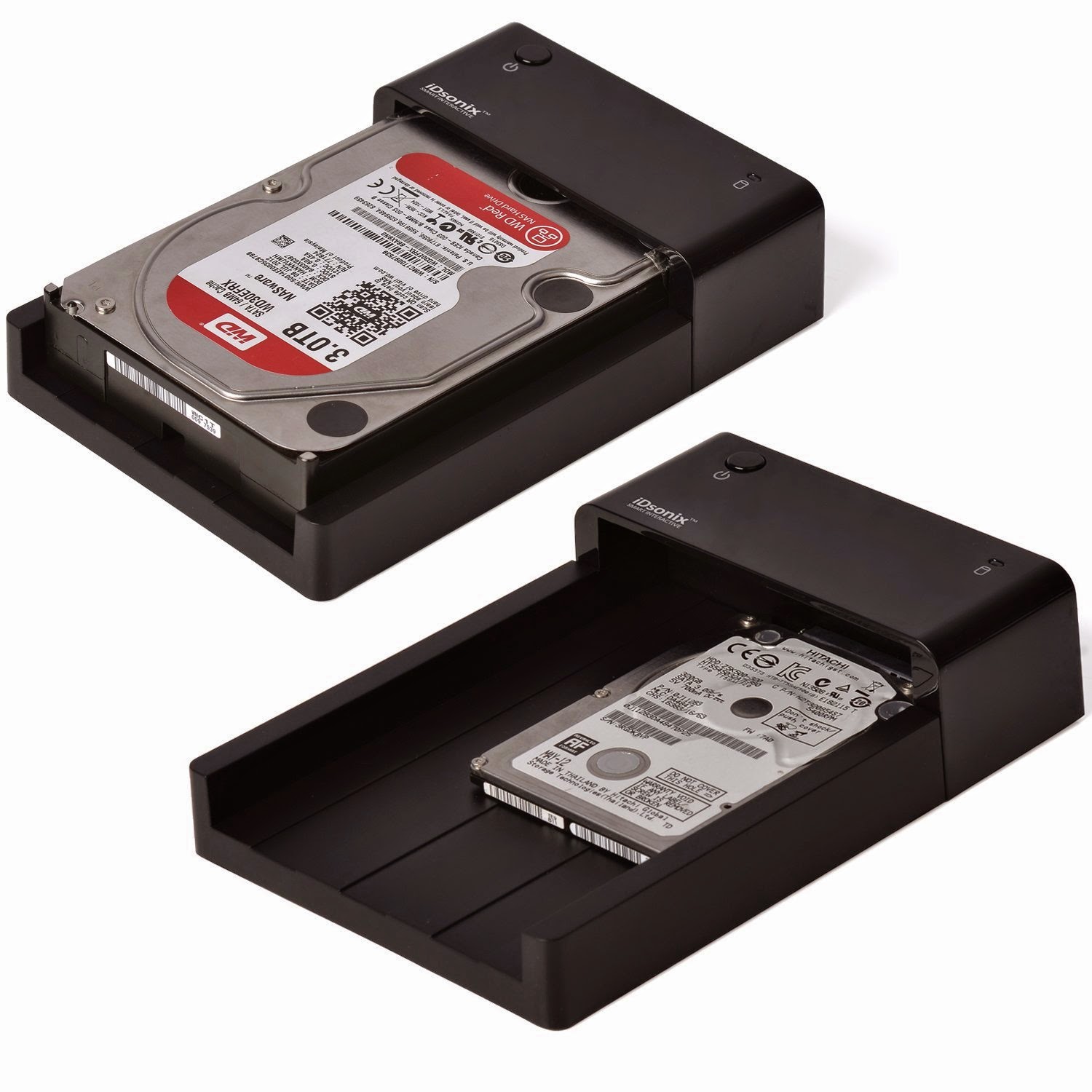
When we need to upgrade our older computers, we will save the hard drives. We may have collected several hard drives from laptops or computers. We can actually turn the internal hard drives into external ones with the help of the hard drive dock station, one of the very convenient peripheral accessories which allows us to create more external storage out of internal hard drives.

If you thrown away your hard drives, why not re-use them and expand the space of the computer or laptop you are using right now? You do not necessarily need to install them internally. Get a hard drive docking station and maximize the use of those old hard drives.

Hard drive dock is to hard drive what carports to cars. The hard drives can just sit on the dock of the bay, without any need of installation. Just drop the drive into the dock. Or when we need to change the hard drive, just eject the current one and pop in a new one. That’s just convenient. The USB 3.0 makes the internal hard drives work faster, with a transfer speed almost the same to that of external drives. USB 3.0 hard drive docking station can handle both 2.5 inch or 3.5 inch HDD or SSD. Such hard drive dock is compatible with USB 2.0 as well.

Now there are different hard drive dock stations available in the market. For example, we can choose dock station with single bay or dual bay for accommodating different numbers of hard drives. Dual bay dock stations or hard drive docking station with more bays allow us to copy data from one drive to another, which is just beyond a single bay dock. Anyway, if we want to maximize the use of old internal hard drive or if we want to make data transfer or copy easier, we need hard drive dock station.


Hard drive dock with one bay

This is a super speed hard drive docking station which accepts either a 3.5 inch or 2.5 inch hard drive, both SSD and HDD. It makes the connection of hard drive and computer free from extra application or tools. Now priced $29.99, this peripheral is an cost effective solution for copying data from the old internal hard drives. The e-SATA and USB 3.0 interface makes the data transfer rates up to 3Gbps and 5Gbps respectively.


Dual bay dock station

This hard drive dock station accommodates two hard drives at the same time, not only expanding the external storage up to 8TB, but also offering us opportunity to duplicate drives easily without any software. The dock makes the offline copy more easily and can ensure multiple data security. It is now priced $35.00. The super speed USB3.0 dock station can realizes data transfer rates up 5Gbps and copying speed up to 60M/s or more.

If a single external hard drive is not enough for backing up the data or if you have collected quite a few internal hard drives from used computers, get a hard drive dock station for recycling the drives.

Tuesday, March 10, 2015

Tips on Choosing Hard Drive Docking Station for HDD or SSD

For those who always need to use hard drives for data copy or transfer, the portable and hot swapping hard drive docking station or hard drive enclosure is very convenient computer peripheral. Hard drive dock station or enclosure makes an internal hard drive into an external one. This is very useful when we need to expand the space of our computer or when we need to access the hard drive of a laptop from an desktop.


Making the internal hard drive external just brings us more flexibility. We just choose the enclosure or dock station and it makes traditional hard drive portable. We can easily transfer data to the hard drive on most of the operation systems. Such external hard drive just reduce the possibility of data corruption or data loss. Data can be backed up or archived much more easily. Besides, we can even recover data from a damaged computer via the hard drive dock station.

Since hard drive enclosure has an close-type design, with the hard drive enclosed in the case. Though portable, it is not easy for changing the hard drives inside. Compared to hard drive enclosure, hard drive dock station seems much more convenient when we need to transfer data between two different HDDs and it can realize quick swapping HDD without the need for external drive enclosure. Then how to choose the hard drive docking station?

Pay attention to the material of the dock station. Hard drive dock station is mainly made from plastics. For better durability, some of the docks are made from steel. Besides, the size of hard drive dock stations differ. Usually, they come with sizes of 2.5 inch or 3.5 inch, supporting the hard drives of 2.5’ and 3.5’ respectively. Take a look at the interface of the different hard drive dock stations. Now HDDs use SATA or IDE interfaces, so the docking station should be chosen accordingly. Some HDD docking stations have extra functions, such as a USB hub or multi-card reader. Choose it according to our need. The cable connecting the dock station to our computer also affects the transfer speed, with USB 3.0 transferring data faster. Now there are hard drive dock stations with different numbers of bays. Single hard drive dock station can only support one hard drive yet dual bay dock take two internal hard drives. Dual bay dock station can offer us larger portable hard drive space.

Hard drive dock station protects our hard drive as well transforms internal hard drives into a plug-and-play device. We can use it anytime while system is running and it will become a removable storage drive.

Tuesday, October 28, 2014

Hard Drive Enclosures Convenient for Data Recovery & Storage

Occupying a large part of the hard drive accessories, hard drive enclosures are cases or shells that hold the hard drive disks. Hard drive enclosure is much like a car’s body which holds all of its parts and accessories to maintain the normal operation of the vehicle. Hard drive enclosure offers connections for hard drive disk and peripherals of the motherboards, which makes the internal computer hard drive into an external ones.

All of our computer has hard drive for storing and accessing a lot of data. The hard drive has a certain amount of memory to storing enough information. The external hard drive enclosure can add an extra auxiliary hard drive to the computer without being inserted into the computer yet increasing the memory space. The external hard drive can be connected easily via USB ports. This is one of the obvious function of the external hard drive. Yet the normal function of the drive needs the hard drive enclosure, with which the drive can be connected with the computer.

Another important use of external hard drive is security. Any crashes or malfunctions may cause the data stored in the computer to be erased. If we use an external drive instead of built-in one, there is little possibility of data loss. For any important information on the computer, just use the external hard drive to transfer the data via hard drive enclosure from the computer.

Now external hard drives are much popular in the market. The external hard drive is actually portable. Once we copy the data to the external hard drive, we can take it to other computers for use in any time we need. This is very convenient for office staff. Its convenience is also reflected in the following situation. When you have extra hard drives that you would love to access the files inside, it will be time consuming if we attach the drive to the computer. We actually can connect the hard drive disk to the USB ports on the computer as long as we have a hard drive dock or hard drive enclosure.

There are a lot of hard drive enclosures in the market. Here I would love to share the features or specifications of the hard drive enclosures or hard drive disks. Usually the drives come with two sizes, 2.5 inches or 3.5 inches. Basically, we need to get the hard drive enclosure with the sizes of 2.5'' or 3.5''. We can also find the hard drive enclosure that fits all different sized drives. The interface of the hard drive may differ. For the hard drive with SATA interface, we may need to use a SATA hard drive enclosure. Yet for an IDE drive, the external IDE hard drive enclosure is the right choice.

For the normal operation of hard drive, ensure to make sure the enclosure is of good quality. Poor one may cause the hard drive to overheat, shorten the lifespan of hard drive or even increase the possibility of data loss.